CineDash
- 4.6
- Rating
- 500.00K
- Installs
- Free
- Price

 Analysis by App-foxy
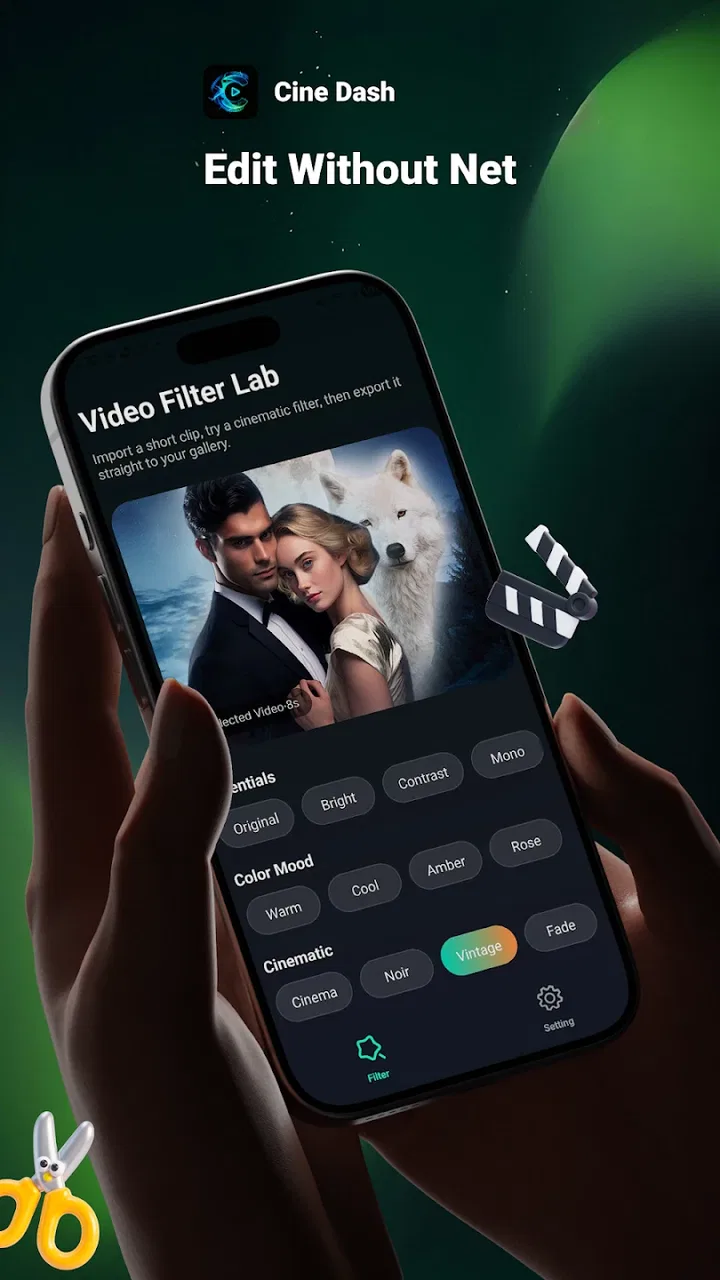
CineDash is a free lifestyle app from Smart it support that focuses on one clear task: adding filters to your videos. I found that narrow purpose useful because it keeps the experience easier to understand than a large editor packed with timelines, stickers, transitions, and tools I may never touch. If I want to give a short clip a different mood before sharing it, this is the kind of app I would try first.
Its store summary is brief, but the practical appeal is easy to see. A filter can make a flat indoor clip feel warmer, give an outdoor scene more contrast, or help several videos from the same occasion look less mismatched. CineDash is not something I would choose as my main production studio. I see it more as a quick finishing step for people who want a visual change without spending time learning a complicated editing system.
How I use CineDash for a simple video workflow
My baseline workflow starts with a clip that already has the right subject and length. I would not open CineDash expecting it to rescue a badly framed recording or replace careful filming. Instead, I choose a video that is broadly ready to share, apply a filter, and judge the result on the parts that matter: skin tones, shadows, bright areas, and whether the effect supports the mood rather than distracting from it.
You May Also Like

 Blood Strike: 2.5 Anniversary
Blood Strike’s Loadouts Turn Every Drop Into a Tactical Gamble
A close look at Blood Strike’s custom loadouts: how fast access to signature weapons reshapes its battle royale rhythm, rewards preparation, and narrows the gap between fights.

 Pandora - Music & Podcasts
Pandora’s Music Is Easy to Start, but Harder to Recover
Pandora’s strength is its low-effort path from a seed to a station. Its weak spot is how much confidence it asks you to place in connection, setup, and quiet recovery.

 8 Ball Pool
 Is Built on Rivalries, Rematches, and Routine
A close look at the rivalries, rematches, shared routines, and unanswered safety questions that turn a quick pool match into a persistent mobile community.

 Samsung Music
’s Quiet Strength Is Playing What You Already Own
Its reach comes less from spectacle than from dependable access to a personal library. That simplicity is both the app’s strongest retention engine and its ceiling.

 AccuWeather: Weather Radar
AccuWeather Review: A Quick, Clear Forecast for Everyday Decisions
For everyday plans, the best forecast is the one you can understand quickly. AccuWeather makes rain timing, radar, and local conditions easy to act on, with a few trade-offs.

 Hill Climb Racing
Why Hill Climb Racing Still Turns Crashes Into One More Run
A tiny car, a bumpy hill and one more upgrade: Hill Climb Racing keeps resurfacing because its simple chaos makes every near-miss feel personal.
More From Our News Desk
View All News


That distinction is important. Filters are easy to overuse because the change is immediately visible. A dramatic look can seem exciting during the first few seconds, then become tiring when the whole video plays. I prefer to compare the original and edited versions before deciding. For a family moment, a meal, a pet clip, or a short travel scene, a restrained adjustment is often more convincing than the strongest available style.
The app’s free status makes this experiment low-risk. I can test it without treating the first session as a purchase decision, which is helpful when I only need an occasional visual touch-up. It is also rated for Everyone, so its basic positioning feels suitable for a broad audience. That does not mean every video will look good with every filter, but it does make the app approachable for casual users.
A realistic everyday example would be recording a quick video of a birthday table under mixed room lighting. The original clip might look slightly dull or uneven because the ceiling light and window light do not match. I would try a warmer filter first, then check whether the cake and people’s faces still look natural. If the effect makes the whites look orange, I would step back rather than forcing the style. The goal is a more pleasant memory, not proof that a filter was used.
I also find a repeatable order helpful. First, I watch the unedited clip once. Next, I test a small selection of filters instead of tapping randomly through every choice. Then I replay the most promising version from beginning to end. This prevents a filter from winning simply because its opening frame looks attractive. Some effects may suit one part of a clip while making another section too dark or too intense.
What to check before choosing a filter
The most useful check is consistency. If a video moves from a bright window to a darker room, an effect that looks balanced in one location may fail in the other. I pay attention to the transition rather than judging only a still frame. This is one of the main differences between casually trying filters and using them with a little discipline.
Faces deserve special attention. A filter that adds a pleasant tone to scenery can make skin appear unusually red, pale, or yellow. When people are the focus, I would choose the effect that changes the atmosphere while leaving facial color believable. For food, I use the opposite test: does the filter make the meal look appetizing, or does it push every color toward the same artificial shade?
Text and small details are another practical concern. If a clip contains a sign, a handwritten note, or details in the background, a strong effect may reduce clarity. I would look at those areas before exporting or sharing. This matters for short clips from markets, events, or trips, where the background often carries as much memory as the main subject.
Because the app is centered on filters rather than a broad editing suite, I would prepare the source video first whenever possible. Trim unwanted seconds using the phone’s normal gallery tools if that is more convenient, then bring the cleaner clip into CineDash. This keeps the filter decision focused and avoids trying to solve several editing jobs in one small app.
Settings and habits that make the result more reliable
CineDash is currently at version 1.0.1.2, so I approach it as a focused tool that may feel more limited than mature all-in-one editors. I would check the available controls during the first session rather than assuming there are advanced adjustments. The key question is whether the app lets me apply its visual treatment in a way that fits my clip, not whether it duplicates every feature found elsewhere.
I also check the preview carefully before committing to a finished file. A preview can look acceptable on a small phone screen while revealing problems when viewed full-screen. I look for crushed dark areas, overly bright skies, and color changes that make moving subjects appear unnatural. This habit is more valuable than simply selecting the most dramatic thumbnail.
When I am editing several clips from one occasion, I try to keep the visual treatment related. I do not necessarily use the exact same filter on every recording, because lighting may differ, but I avoid jumping between completely opposite looks. A small family montage feels more coherent when the clips share a similar warmth or contrast. CineDash is useful here as a repeatable finishing step, provided I make the comparisons myself.
Storage is worth considering before creating multiple versions. Video files can take more room than expected, especially when I keep the original beside the edited copy. My habit would be to retain the original until I have checked the final result, then remove unnecessary duplicates. This is not a special feature of CineDash; it is simply a sensible workflow when experimenting with visual edits on a phone.
I would also avoid editing while rushing to share something important. If a clip is needed immediately, the phone’s built-in sharing and gallery tools may be faster. CineDash makes more sense when I have a moment to compare the look and decide whether the change improves the video. A filter should reduce effort overall, not create a second task of checking an impulsive choice.
Faster patterns for regular use
Experienced use does not require complicated tricks. It comes from repeating the same small decisions. I keep a simple mental shortlist: a natural-looking option for people, a warmer option for indoor scenes, and a stronger option only when the subject can handle it. This reduces browsing and helps me reach a useful result quickly.
Another efficient pattern is to judge the first and last moments of the clip before watching every variation in full. If a filter immediately damages the opening face or makes the closing scene too dark, I discard it early. Once I have two realistic candidates, I watch those versions all the way through. This saves time while still protecting against a poor final result.
For social sharing, I think about the destination before applying an effect. A video viewed in a small feed can tolerate a little more visible contrast than one intended for a television or a larger screen. If I am unsure, I choose the more restrained version. Strong processing tends to be harder to undo once the edited copy has replaced the original in my sharing routine.
CineDash can also fit a quick “one clip, one decision” habit. Instead of opening it with a vague plan to edit an entire camera roll, I select the single video that needs attention. That keeps the app’s focused design working in its favor. It is especially practical when I have a short clip from a walk, a recipe, a room makeover, or a pet doing something amusing and want to make it feel more intentional.
For repeated events, I would create a personal rule before editing: natural for conversation, warm for indoor memories, and stylized only for clips where atmosphere matters more than accurate color. The rule is not built into the app, but it makes the experience faster and more consistent. It also prevents me from choosing a filter based only on its name or thumbnail.
Where the focused approach reaches its limits
The same simplicity that makes CineDash approachable can become a drawback for demanding projects. If I need precise trimming, layered audio, captions, transitions, speed changes, masking, or detailed color correction, I would move to a fuller editor. A filter-focused app is not the right replacement for a timeline-based workflow when the story depends on exact timing.
I would also skip it when the main problem is shaky footage, poor audio, or a badly composed shot. A visual treatment may change the mood, but it cannot repair every technical weakness. In those cases, a camera technique, a stabilizing tool, or a more complete editor would be a better answer. CineDash works best after the recording itself is already reasonably usable.
There is a trade-off between speed and control. A dedicated filter app can help me reach a finished-looking clip with fewer decisions, but fewer decisions can also mean fewer ways to correct a difficult scene. If I want to fine-tune individual colors or make different adjustments to separate sections, I would prefer an editor designed for manual control.
It is also worth being realistic about occasional use. Someone who edits videos every day may outgrow the app quickly because a broader tool can keep trimming, sound, titles, and visual treatment in one project. On the other hand, that broader tool may feel excessive for a person who only wants to make a phone video look less plain. CineDash has the clearest advantage when the alternative is not professional software but doing nothing because editing feels like too much work.
The app’s early version status reinforces that practical boundary. I would keep expectations centered on its stated purpose rather than assuming it offers a complete creative workstation. That mindset makes the experience more satisfying: I open it for a visual finish, not for a full post-production process.
Who will get the most from it
I think CineDash is a good match for casual creators, families, students, travelers, and anyone who records short videos but rarely edits them. It is also suitable for someone who finds large editing apps intimidating. The free price removes a common barrier, while the Everyone age rating keeps its presentation broadly accessible.
It may appeal to people who want a consistent look across informal clips without learning color-grading terminology. A small business owner could use it for simple behind-the-scenes videos, provided the content does not require captions, branding layers, or precise corrections. A hobby cook might use it to make a quick recipe clip feel warmer, while a traveler could give several outdoor recordings a more unified atmosphere.
I would recommend a different option to filmmakers, frequent short-form publishers, and users who need detailed control over sound and timing. They will likely value a complete editor more than a quick filter step. I would also steer away from it if sharing speed is the only priority and the phone’s built-in tools already provide an acceptable result.
My verdict after building a repeatable routine
CineDash succeeds because its purpose is easy to grasp: take a video and give it a different visual feel. I like it most when I use it deliberately, compare the original with the edited version, and choose a filter that supports the subject instead of overpowering it. The strongest results come from habits around the app—checking faces, watching the full clip, keeping related footage visually consistent, and preserving the original until the result is safe to share.
Smart it support has positioned this as a lightweight lifestyle tool rather than an all-purpose editing platform. With a 4.6 average from around 8.2 thousand ratings and over 100 thousand installs, it has attracted meaningful interest for such a focused idea. Those figures do not change the app’s limits, but they do suggest that its straightforward approach resonates with people who want a quick visual improvement.
For me, the deciding question is not whether CineDash can replace every alternative. It cannot, and it should not be judged by that standard. The better question is whether I want a simple filter step before sharing a video. When the answer is yes, its free access and focused workflow make it worth trying. When I need editing layers, exact corrections, or production-level control, I would choose a fuller tool and use CineDash only if I wanted a particularly quick finishing pass.
My recommendation is simple: use CineDash for fast, thoughtful visual changes, not as a substitute for a complete video editor. If you build the small habits above, the app feels more capable than a random filter tap, while its boundaries remain clear enough to avoid disappointment.
FAQs for CineDash
01What is CineDash and what features does it offer?
CineDash is a comprehensive movie and TV show tracking app that helps users manage their watchlists, explore new releases, and receive personalized recommendations. It includes features like ratings, reviews, trailers, and social sharing options. Users can also set reminders for upcoming releases, ensuring they never miss a premiere.
02Is CineDash free to use, or does it require a subscription?
CineDash offers a free version with basic features, supported by ads. For an enhanced experience, users can opt for a premium subscription. The premium version removes ads and unlocks additional features such as advanced analytics, exclusive content recommendations, and priority customer support.
03How accurate are CineDash's movie and TV show recommendations?
CineDash employs a sophisticated algorithm that analyzes user preferences, viewing history, and ratings to provide personalized recommendations. While the algorithm aims for accuracy, individual tastes can vary, so recommendations may not always align perfectly. Users can refine suggestions by providing feedback on recommendations.
04Can I use CineDash offline, or does it require an internet connection?
CineDash primarily requires an internet connection to access its full range of features, such as streaming trailers and syncing watchlists. However, users can download certain content and manage their watchlists offline. Offline access is limited, and syncing is necessary once reconnected to the internet.
05Is my data secure when using CineDash?
CineDash prioritizes user privacy and data security. The app implements robust encryption protocols to protect personal information and adheres to strict privacy policies. Users can control their data settings, ensuring transparency. Regular updates maintain high security standards, safeguarding user information.
Pros
- Intuitive interface for easy navigation.
- Wide selection of movies and TV shows.
- High-quality streaming with minimal buffering.
- Personalized recommendations based on viewing history.
- Offline download option for on-the-go watching.
Cons
- Limited availability in some regions.
- Ad-supported free version can be intrusive.
- Occasional glitches in search function.
- Some content requires additional fees.
- Frequent updates may consume storage.

CineDash
Gallery